Select the Semantic Resource
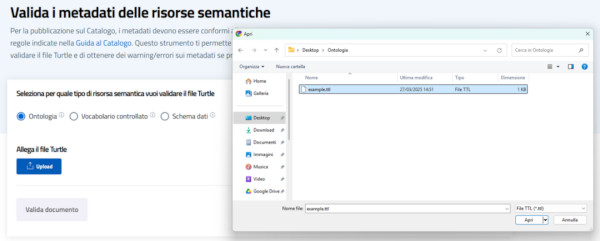
Select the semantic resource you want to validate by choosing from: ontology, a controlled vocabulary, or a data schema. You can upload a file in Turtle (.ttl) format via the validator interface, choosing it from your device or a specified source.
Click on “Upload” to select the Turtle file (.ttl) to be uploaded to the validator.
Please note
Before proceeding with the validation of the resource, it is necessary to verify that the semantic resource complies with the rules defined in the Catalogue Guide .
Validation of the semantic resource
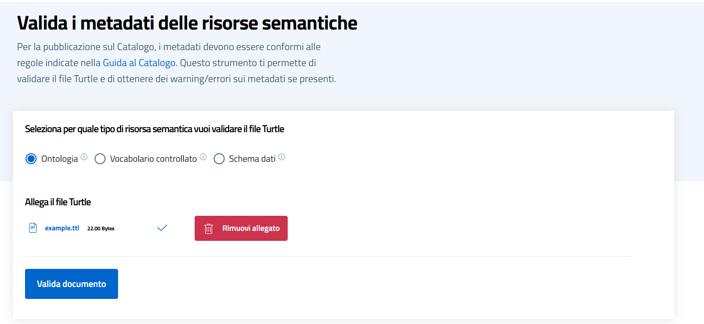
After selecting and uploading the semantic resource, you can proceed with the validation.
Click on ‘Valid document’ to start the process of checking the uploaded Turtle file. The validator will analyze the resource to identify any errors or warnings in the metadata, returning a detailed report of the outcome.
Please note
It is advisable to carefully examine the messages returned at the end of the validation to correct any critical issues before the publication of the resource.
Possible outcomes
Once the document has been validated, the system could report three possible outcomes:
- Error
- Warning
- Positive outcome
Error
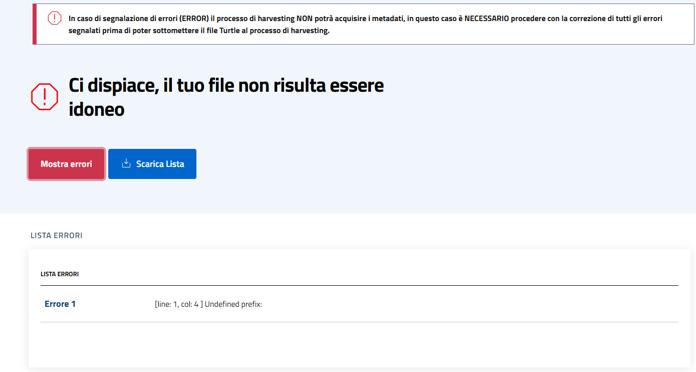
If there is an error during validation, the system automatically reports problems in the file.
Note:
When an error is revealed, the validator will show a numbered list of errors and a brief description of the error detected
In addition, it is possible to download the complete list of errors found, which is useful for carrying out an in-depth analysis and correcting the Turtle file.
Please note: Error messages are “blockers”. If there are unresolved errors, the harvesting process will not be able to capture the metadata of the resource and therefore this resource will not be uploaded to the catalog.
It should also be noted that, while the Warnings are all returned together, the error messages are returned one at a time. In other words, if there are multiple errors, the validator will return only the first one. Once the error has been resolved, you will need to re-upload the Turtle file (.ttl) and check for any further errors.
Outcome "Warning"
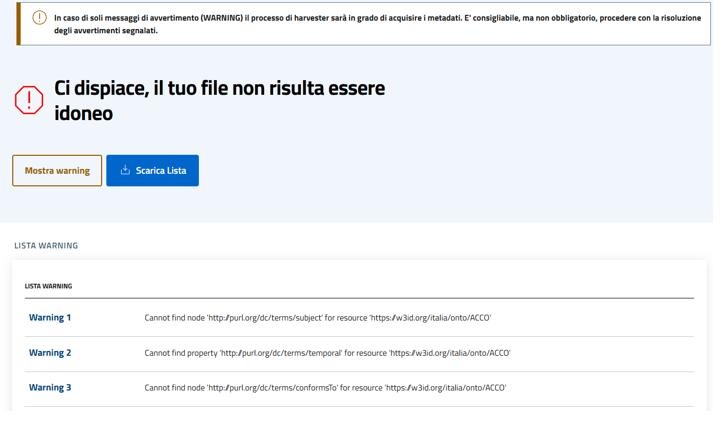
During validation, in addition to errors, the validator can also report warnings, or warnings that indicate potential problems or shortcomings in the Turtle file.
Note:
The list of warnings shows the detected problems that, while not preventing the validation of the document, can compromise the completeness or correctness of the metadata. Each warning provides information including:
- The URI of the resource involved;
- The missing or unrecognized property;
- The resource to which the problem refers.
Please note: Warning messages (warnings) are not blocking. The harvesting process will be able to capture metadata. However, it is advisable, but not mandatory, to proceed with the resolution of the reported warnings.
Positive outcome
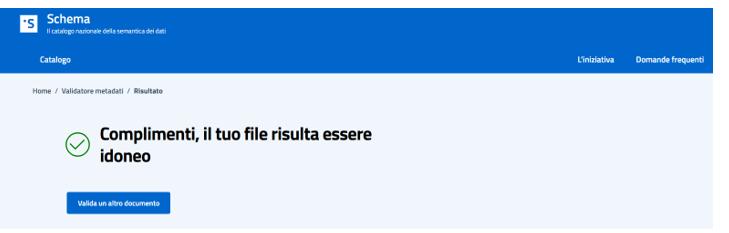
When the validation of the semantic resource is completed without errors, the system returns a positive result, indicating that the Turtle file complies with the rules provided.
If successful:
- No errors will be reported in the document;
- Warnings may appear, which do not prevent validation but suggest improvements.