Schema Editor Features
The Schema Editor provides functionality to embed semantic metadata information into the OpenAPI/JSON Schema of the API. Two key functions are the possibility to configure the SPARQL endpoint, which is then useful for querying RDF-type resources, and the activation of automatic completion for terms and classes.
Configure the SPARQL endpoint
The Schema Editor queries external resources using SPARQL, a language designed to query RDF datasets.
Di default, l’editor utilizza un endpoint SPARQL preconfigurato. Tuttavia, è possibile modificarlo per collegarsi a un diverso server SPARQL, utile ad esempio quando si lavora con dataset personalizzato o infrastrutture RDF distribuite. Per farlo, cliccare sull’icona hamburger (≡) situata nell’angolo superiore sinistro dell’interfaccia.
To change the SPARQL endpoint:
- Click on the burger icon (≡) in the upper left corner of the interface.
- Select the Configuration item from the side menu.
- Inserisci l’URL del nuovo endpoint SPARQL nel campo dedicato. Una volta salvata la configurazione, l’editor utilizzerà il nuovo endpoint per tutte le interrogazioni.
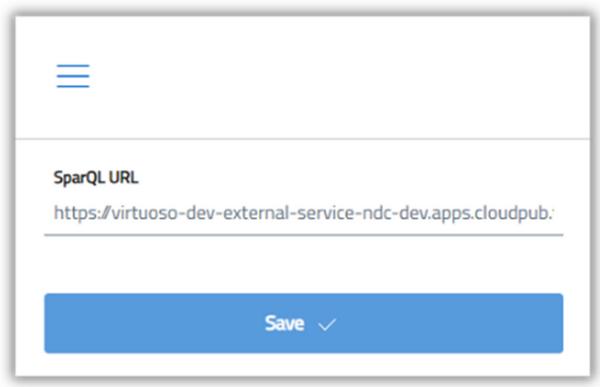
Immagine descrittiva di finalizzazione della configurazione dell’endpoint SparQL.
Use autocomplete
Schema editor is able to automatically suggest terms and classes when typing, based on a selected set of vocabularies available in the schema.gov.it catalog. To use self-completion:
- Premendo la combinazione CTRL + SPACE si aprirà un menu a tendina con un elenco di suggerimenti compatibili;
- By typing in text, the list will be filtered dynamically;
- Premendo INVIO su un suggerimento, l’editor completerà automaticamente il campo con l’URI corretto della classe o proprietà selezionata.
This functionality greatly simplifies the insertion of correct references and reduces the risk of invalid syntax or URI errors.
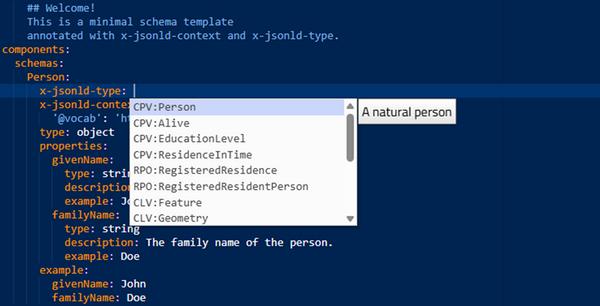
Immagine descrittiva di funzionamento dell’autocompletamento.
Navigation of the Data Models section
The Data Models section of the Schema Editor provides a structured overview of all RDF classes defined in the schema. It is designed to facilitate the analysis of the properties associated with each class and their semantic links.
Main functionalities
- Automatic display of RDF classes The editor automatically retrieves all RDF classes in the schema. For each class, the following are listed:
• The associated properties;• Semantic links resulting from mappings with reference classes.
- Details for each property Each property displayed is enriched with useful information for understanding the model:
• Syntactic type (e.g. string, number, object);
• Semantic type (associated RDF URI);
• Textual description;
• Usage example, generated according to schema definitions. - OntoScore Calculation – Semantic Coverage Indicator The Schema Editor calculates an indicator called OntoScore, which measures the semantic mapping level of the schema. It is defined as the ratio of the total number of properties present in the JSON Scheme to the number of properties correctly mapped with a rdf:Property. This score helps to assess how semantically aligned the schema is with RDF vocabularies.
- When a class is linked to a controlled vocabulary, the "Show values" button appears. Clicking it, you go directly to the corresponding section on schema.gov.it, where all the allowed values for that property are listed.
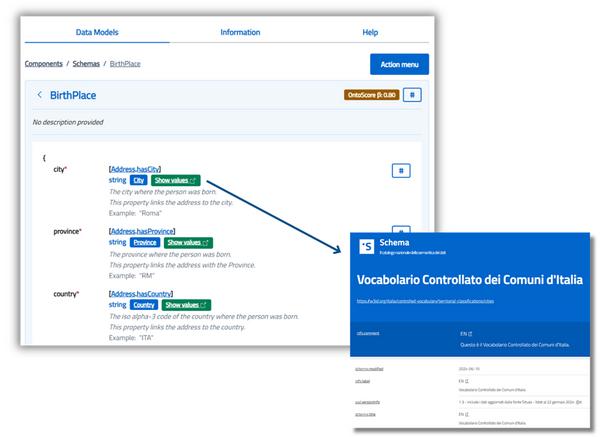
Immagine descrittiva della sezione Data Models con le sue funzionalità.
Navigation of analysis tools
This section of the Schema Editor collects a set of tools designed for semantic analysis, RDF visualization and JSON-LD compatibility validation. Through different interactive panels, it is possible to explore the structure of the schema, understand its semantic meaning and verify its behavior in real RDF contexts.
Use JSON-LD Playground
The Schema Editor allows you to automatically generate an example and open it in the external JSON-LD Playground tool. This function allows you to:
- Display the input JSON produced by the schema;
- Examine the JSON-LD context and its @type;
- Get an RDF serialization in Turtle, RDF/XML and N-Quads formats.
This tool is useful for testing the correctness of the semantic representation of data.
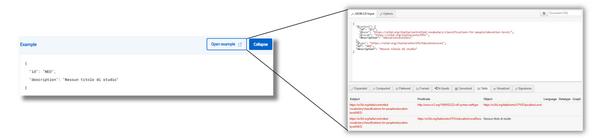
Descriptive image of semantic analysis with JSON-LD Playground.
Use RDF triplets
The RDF section shows the schema information in RDF triplets (in the form subject – predicate – object), providing a clear representation of the semantic structure. This view allows you to:
- Visually explore the semantic relationships between entities and properties;
- Verify the consistency of the model with the RDF graph;
- Understand how schema instances will be interpreted in semantic systems
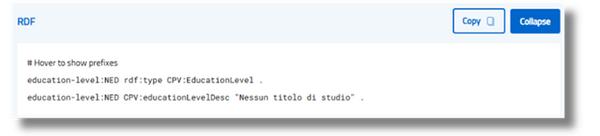
Descriptive image of RDF triplets.
Use JSON-LD Context
The content of the JSON-LD Context section is automatically generated from the metadata (x-jsonld-type and x-jsonld-context) in the schema. Among the main features:
- Respects the hierarchy of the scheme, maintaining a coherent context;
- Apply automatic context inheritance to child levels, unless otherwise specified;
- Generates output compliant with JSON-LD specifications, ready to be integrated into systems based on RDF ontologies.
This panel is key to ensure effective semantic integration and interoperable data publication.
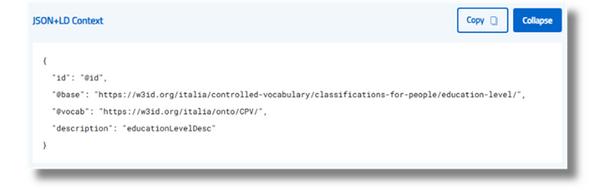
Descriptive image of the JSON-LD Context section.
Use Action Menu
The Schema Editor Action Menu provides quick access to several useful features for managing, exporting and sharing semantic schemas.
It can be accessed via a dedicated button located in the main interface of the editor.
Main functionalities
- Creating a new template You can generate a basic template, containing a single example class: Person, with properties givenName and familyName. This basic model can be used for:
• Exploring the structure and logic of the scheme;
• Easily add new classes and properties;
• Start defining a custom schema, e.g. a semantic model of “Person” with related ontological classes. - The schema currently in use can be downloaded in several formats:
• Native format (“as-is”), useful for direct re-use in the Schema Editor;
• JSON format, suitable for integration into external systems or further processing. - Sharing the scheme
An option is available to copy the schema as a URL, allowing for quick and easy sharing with other users or tools. This link shows a persistent representation of the schema, ready to be opened in the same editor or in compatible environments. - Opening the schema in a remote instance
The same schema can be opened within a previously configured remote instance of the Schema Editor (e.g. in a third-party application or custom environment). This function is particularly useful in contexts where the editor is integrated into a management system, a document portal, or a dedicated semantic development environment.
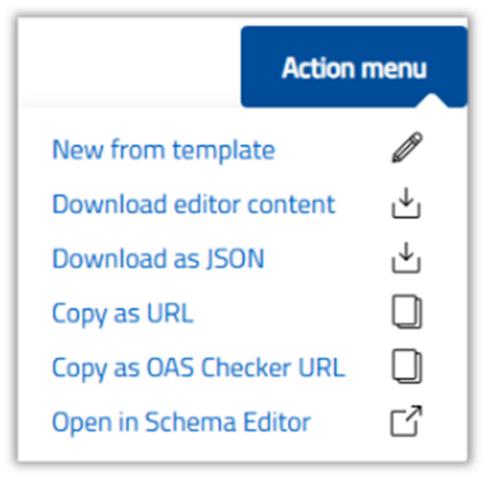
Immagine descrittiva dell’Action menu.
Consult RDF Helper
The RDF Ontological Class Helper is an integrated tool in the Schema Editor designed to support users in the advanced semantic design of schemas.
This feature helps to explore the RDF properties associated with a specific semantic class, facilitating the proper mapping of properties and improving the overall semantic quality of the schema.
- The tool automatically performs a SPARQL query on the semantic class indicated in the x-jsonld-type field of the schema.
- All the rdf:Properties associated with the class are retrieved, with useful details for each property, including:
• rdfs:range: indicates the type of expected value (e.g. Literal, URI, etc.);
• rdfs:comment: provide a textual description of the property;
• Example of use: helps to understand how to correctly integrate the property into the scheme.
The properties identified are inserted in an interactive panel, from which the user can analyse them and decide whether or not to integrate them into their model.
This tool is particularly useful for extending the semantic coverage of the schema, ensuring proper alignment with standard RDF vocabularies, reusing existing properties, reducing redundancy and fostering semantic interoperability.
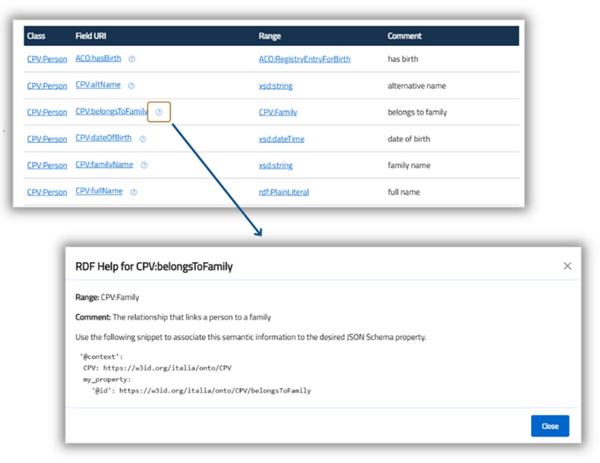
Immagine descrittiva dell’utilizzo di RDF Helper